
 Counter-Strike 2
 Valorant
 Dota 2
 League of Legends
Open Play → Matchmaking → Private Matchmaking, create a pool, and share its full code. The mode runs on a Valve server and starts when exactly ten humans search through the same pool; two parties of five preserve fixed sides. It does not add bots or accept custom console settings. Use Play → Practice for bots, smaller groups, an official map, or local commands.
Verified on 30 August 2026 against current Valve, Steam, and live-build sources. This guide separates Valve Private Matchmaking, locally hosted Practice, Workshop Maps, community servers, and dedicated servers because their ownership and limits differ. Exact menu labels and undocumented eligibility can change. The terms “private lobby,” “private match,” and “custom game” are loose community labels rather than one feature.
Which CS2 Private-Play Route Do You Need?
| Goal | Route | Server Owner | Players | Map And Rules | Hard Limit |
|---|---|---|---|---|---|
| Closed normal 5v5 | Private Matchmaking | Valve | Exactly ten humans in the match; wider pool cap unpublished | Current Premier veto; fixed rules | No bots, direct map pick, or custom commands |
| Official map, bots, or fewer players | Practice | Host PC | Can start alone; universal maximum not published | Direct official-map pick and supported local settings | Ends when the host leaves |
| Aim, surf, training, or another custom map | Workshop Maps | Host PC | Can start alone; cap is map/config dependent | Direct Workshop-map pick; map-specific rules | Downloads and support vary by map |
| Ready-made public or passworded mode | Community Server | Third-party operator | Server-defined | Operator controls maps, plugins, teams, and rules | Your party has no admin control |
| Persistent scrims and chosen region | Dedicated Server | You or a provider | Can run empty; slots are configured | Full supported operator control | You own security and maintenance |
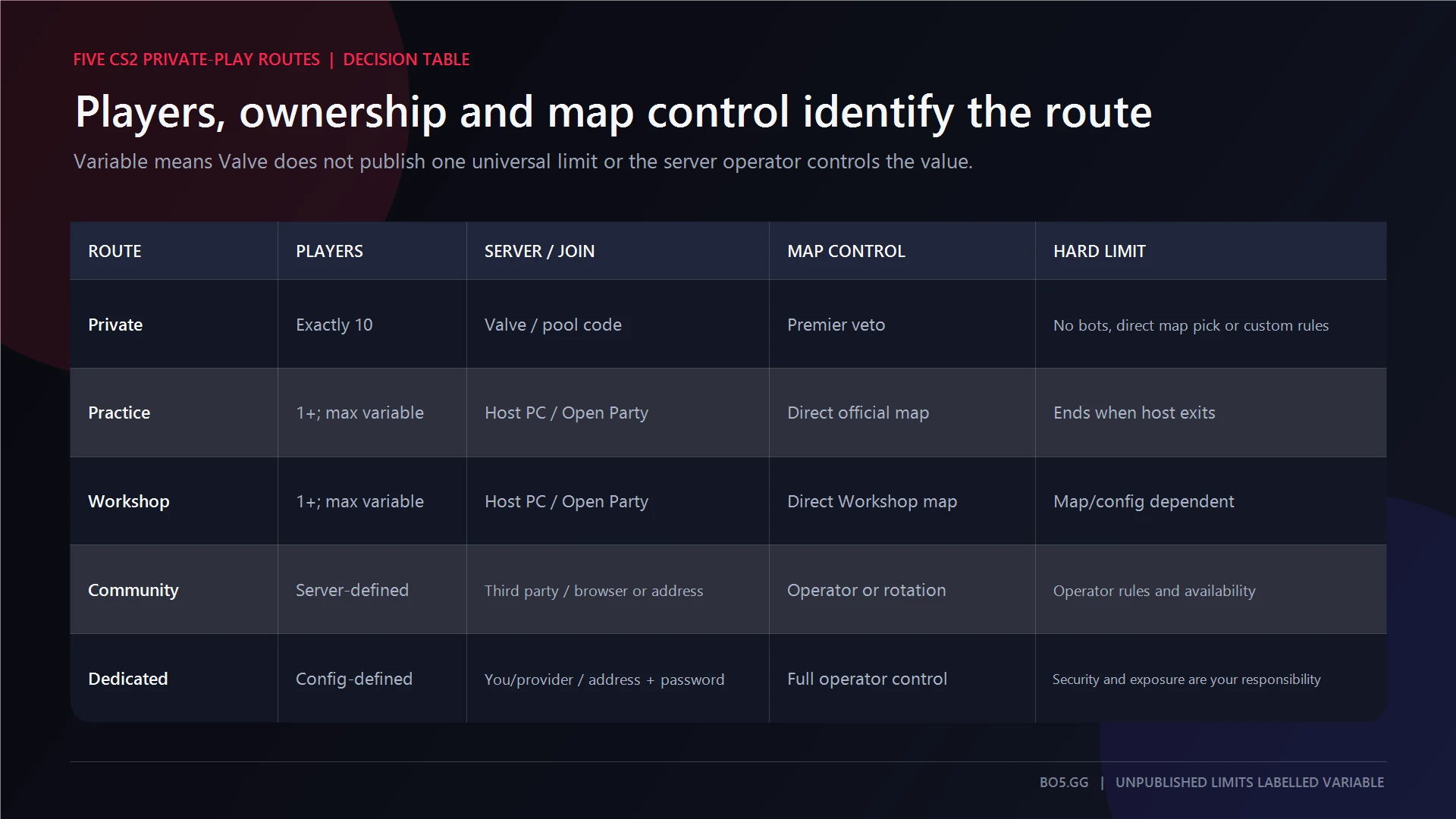
Private Matchmaking is only for a Valve-hosted 10-man. A 1v1, 2v2, bot match, exact map, or cheat-enabled practice session belongs in another route.
Create And Join A Valve Private Matchmaking Pool
Valve’s original Private Queue announcement confirms that players can form teams or enter alone and let matchmaking sort them.
Host Or Organizer
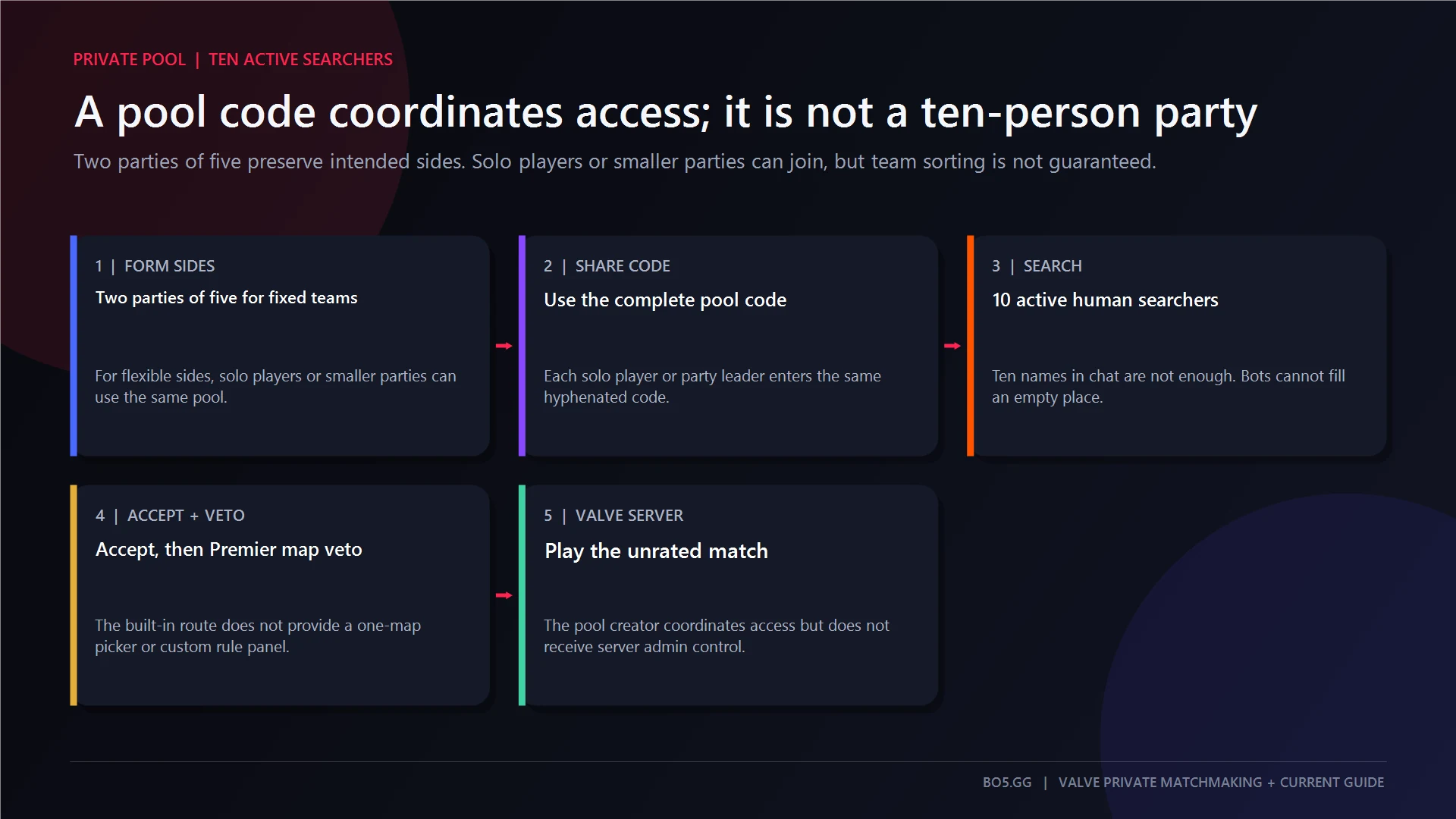
- For fixed sides, create two separate parties of five. A matchmaking pool is not a ten-player party.
- Open
Play → Matchmaking → Private Matchmaking. - Select
Create a Private Matchmaking Pool. - Copy the complete code exactly as displayed and send it privately.
- Every solo player or party leader enters that code and starts searching.
- When all ten eligible humans are allocated, everyone accepts.
- Complete the normal Premier-style map veto and join the Valve server.
Ten people sitting in chat is not enough. The relevant solos or party leaders must be actively searching through the same pool. Bots cannot fill missing places.
Guest
A solo guest opens Play → Matchmaking → Private Matchmaking, chooses the manual code-entry option, pastes the full code, confirms it, and searches.
For a pre-made team, only the party leader needs to enter the pool and start the party’s search. Stay in the party through allocation to preserve the intended side. Steam Group pools also exist, but they are group-specific rather than general room codes.
Reconnect And Cleanup
Use Reconnect immediately when offered. Steam publishes general Competitive reconnect and abandonment rules, not a separate Private Matchmaking grace period, so do not assume a disconnect is penalty-free.
Finish the match and leave the queue. Valve does not publish a guaranteed pool-code lifetime, expiration period, or revocation contract.
Requirements And Limits By Route
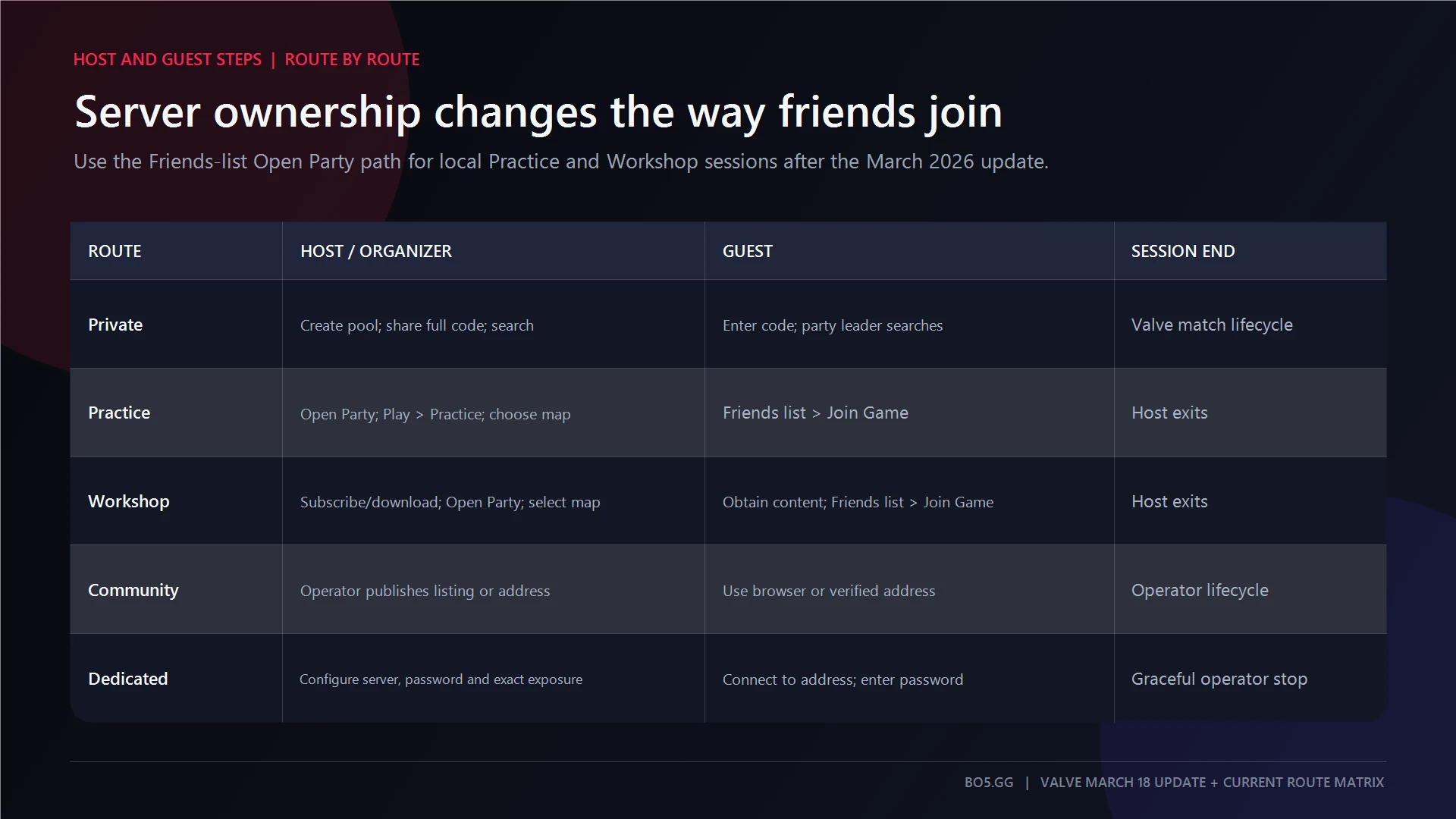
| Route | Join Method | Teams | Map | Reconnect | End And Cleanup |
|---|---|---|---|---|---|
| Private | Pool code or Steam Group pool | Two five-stacks preserve sides; solos may be sorted | Premier veto | Use client Reconnect when available | Finish and leave pool; code lifecycle undocumented |
| Practice | Open Party, then Friends-list Join Game |
Mode and host settings | Direct official-map pick | Host session must remain alive and joinable | Host exits; restore party privacy |
| Workshop | Open Party, then Join Game |
Map/config dependent | Direct subscribed-map pick | Host session and compatible map version required | Host exits; subscription remains |
| Community | Browser, Favorite, History, friend, or address | Operator, auto-balance, or plugins | Operator, rotation, or vote | Server online with a free slot | Guest disconnects; operator controls shutdown |
| Dedicated | Address/password, browser, or Favorite | Admin/config/plugins | Operator-controlled | Process, version, access, and slot must remain valid | Graceful stop; remove temporary exposure and rotate leaked secrets |
No authoritative universal maximum was found for Practice or Workshop. Community capacity is whatever the operator advertises. Dedicated-server slots are configuration, mode, map, and hardware dependent.
How To Host Practice With Friends
Practice is the quickest route for an official map, a small group, bots, grenade work, or local console settings.
- Set the lobby to Open Party.
- Open
Play → Practice. - Choose the mode, official map, and visible options.
- Select
GOand remain in the map because your PC hosts the listen server. - Friends select you in the Steam or CS2 Friends list and choose
Join Game.
Since Valve’s 18 March 2026 update, friends can join an open Practice session after launch. Party access does not guarantee T or CT assignment; the mode, team selector, auto-balance, and host settings decide teams.
A disconnected friend can rejoin while the session remains open. The host leaving ends it. Turn Open Party off afterward. Repeated settings can be saved with a CS2 practice bind.
How To Play Workshop Maps With Friends
- Subscribe to the map in Steam Workshop and let the download finish.
- Enable Open Party.
- Open
Play → Workshop Maps, select the map, and chooseGO. - Friends use the host’s
Join Gameaction and allow Steam or CS2 to obtain required content.
Review the Workshop description before launch. Player capacity, teams, bots, spectators, dependencies, scoring, and navigation are map-specific. A stationary bot may mean the map lacks usable navigation data rather than that the connection failed.
The host leaving ends the session. Quitting does not unsubscribe the map. Never install an unexplained executable, DLL, credential tool, or “client SourceMod” package just to join. Valve’s Workshop FAQ documents normal subscription and map delivery.
When To Use A Community Server
Open Play → Community Servers through the current globe/server-browser control. Filter by region, latency, map, mode, occupancy, password, and security state. You can also use Favorites, History, a friend, or a trusted direct address:
connect <trusted-host-or-IP>:<port>
The person who finds the server is not its operator. The operator controls slots, teams, auto-balance, maps, plugins, bots, spectators, bans, restarts, and logs. A Steam party does not reserve one team.
Community servers are not automatically VAC-free. Steam says VAC applies to VAC-secured servers, while standalone servers may also run insecure. SourceMod is server-side; normal players do not install it to connect. For a ready-made competitive option, BO5 lists CS2 5v5 servers.
When A Dedicated Server Is Better
Use a dedicated server for repeat scrims, a chosen datacenter, stable passwords, persistent configs, server-side demos, admin control, or deliberately configured observers.
- Prefer a reputable game-server provider or regional VPS when home hosting faces CGNAT or unreliable inbound access.
- Run the service with least privilege.
- Install current CS2 files with SteamCMD and App ID
730, not legacy App ID740. - Place configuration in the current tree, commonly
game/csgo/cfg/server.cfg, and set only the required name, password, mode, map, slots, logs, and admin controls. - Use a unique Game Server Login Token where required. Keep the GSLT secret; Steam treats it as an operator credential.
- Test in order: process, local connection, LAN connection, direct Internet connection, then optional browser listing.
- Add only the exact firewall, provider security-group, or NAT rule proven necessary by the running listener.
- Stop gracefully, remove temporary rules, and rotate exposed passwords or tokens.
A current installation pattern is:
steamcmd +force_install_dir <server-directory> +login anonymous +app_update 730 validate +quit
Guests should obtain the operator-approved hostname or address, exact port, and match password. They can join through Favorites, the server browser, or a trusted direct connection. They never need the GSLT, hosting login, firewall access, or admin token.
Do not disable the whole firewall, use router DMZ, open broad Steam port ranges, expose RCON or netcon publicly, or treat -ip as a CGNAT fix. SourceTV and additional spectator access should remain disabled unless they are deliberately configured and protected.
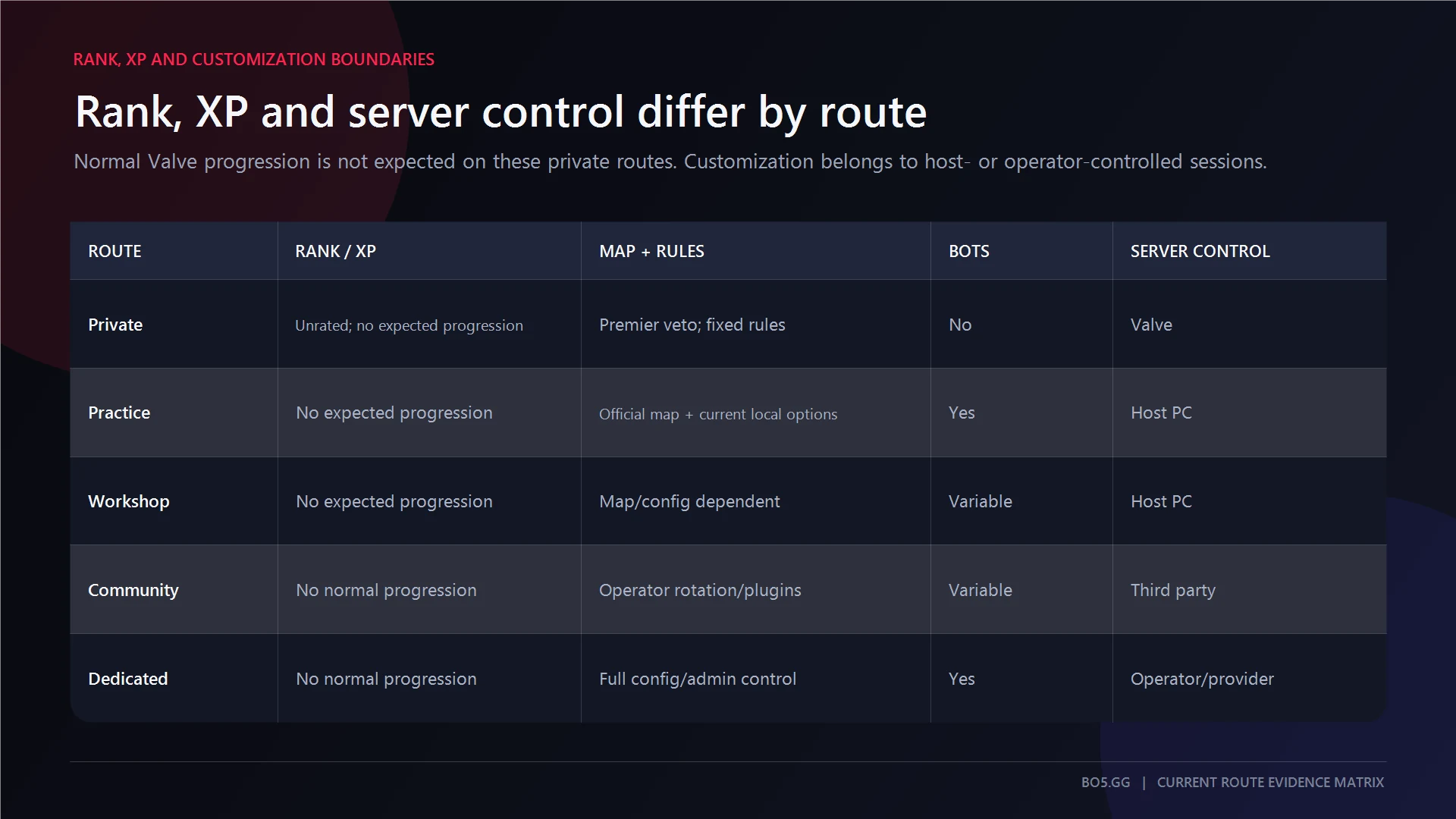
Rank, Customization, Region, And Persistence
| Route | Valve Progression | Rules And Bots | Region | Spectators | Persistence |
|---|---|---|---|---|---|
| Private | Treat as unrated and not a progression route | Fixed; no bot filling | No documented selector | No verified extra spectator seat | Valve match lifecycle |
| Practice | No normal matchmaking progression | Host settings; bots where supported | Host location | Mode/config dependent | Ends with host |
| Workshop | No normal matchmaking progression | Map/config dependent | Host location | Map/config dependent | Ends with host |
| Community | No normal Valve progression; local ranks possible | Operator-controlled | Choose a listing | Operator/slot dependent | While server stays online |
| Dedicated | No normal Valve progression; private stats possible | Full supported operator control | Chosen host/datacenter | Configurable | Persistent process |
Do not use Private Matchmaking for CS Rating, Competitive Skill Group, XP, missions, or Weekly Care Package progress. BO5’s guide to CS2 ranks and Premier rating explains those separate systems.
Valve documents Prime Status and Profile Level 10 for public Premier, but not a separate Private Matchmaking entitlement rule. Buying Prime is therefore not a guaranteed repair for a missing tab.
Why The Lobby, Code, Map, Or Connection Is Not Working
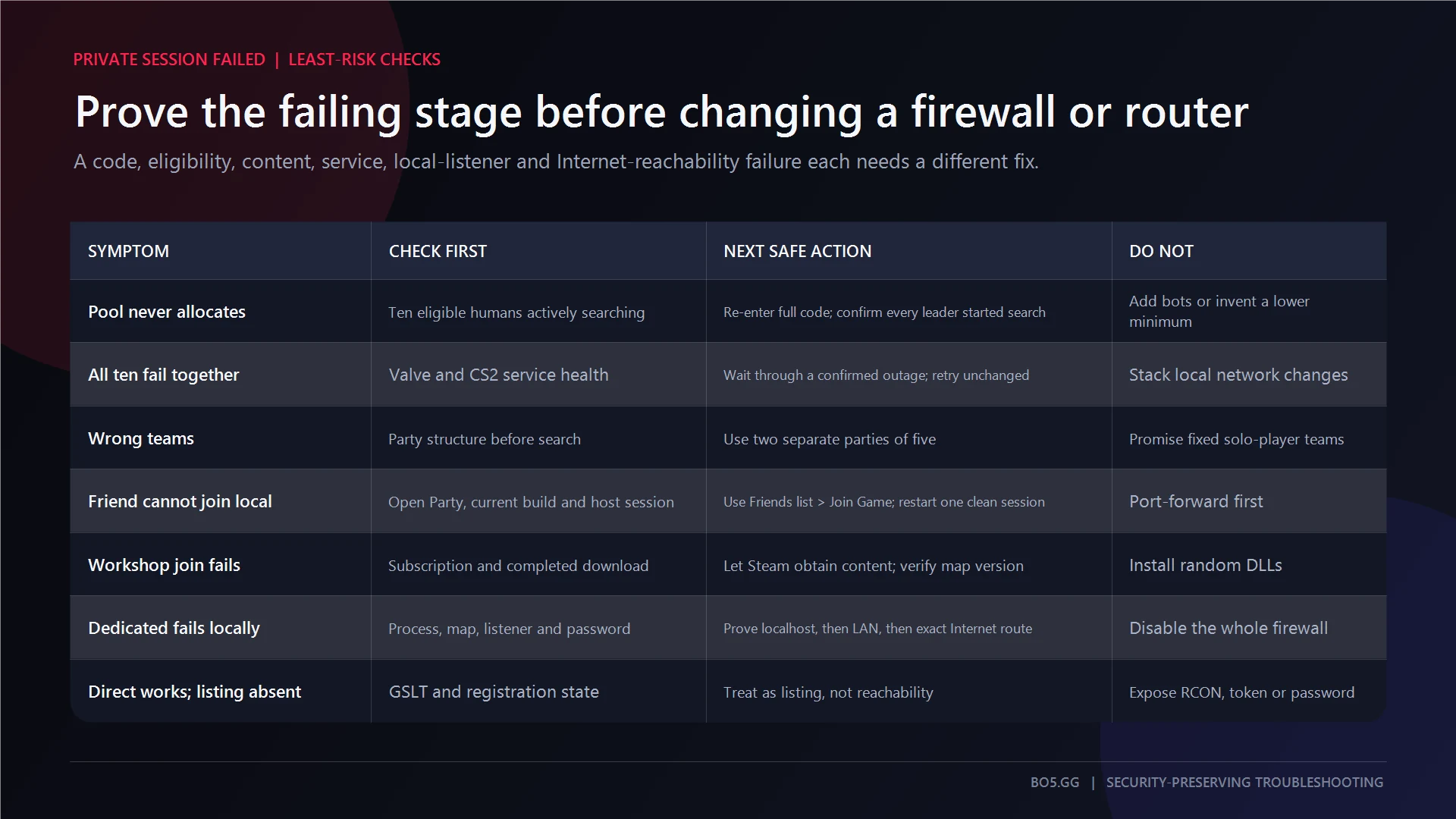
Work from the least disruptive check downward.
Private Pool
- No start: Confirm ten humans, the same pool, and active searches by every solo or party leader. Below ten, switch routes.
- Invalid code: Copy it again, preserve every character and hyphen, remove chat whitespace, and use Private Matchmaking’s manual code field. Update and restart Steam and CS2 once.
- Wrong teams: Rebuild as two five-player parties. Ten solo players are not guaranteed fixed sides.
- Wrong map expectation: Private Matchmaking uses Premier veto. Use Practice or dedicated hosting for one exact map.
- Missing tab: Update and restart, check online/account restrictions, then use
Library → Counter-Strike 2 → Properties → Installed Files → Verify integrity of game files. Check whether CS2 is down before changing the PC. Treat Prime or public Premier eligibility only as clues, not guaranteed fixes. - Match found, connection fails: Reconnect promptly, restart the failed client once, and verify that player’s files and Steam session. If all ten fail together, suspect Valve allocation or service trouble. Do not alter router forwarding for a Valve server.
- Poor region or ping: No public Private Matchmaking region selector is documented. Reduce cross-continent spread or use a dedicated server in a suitable datacenter.
Practice And Workshop
Confirm the host is inside the map, Open Party is enabled, and the guest uses Friends-list Join Game. Check the Steam overlay, update both clients, restart the host session, and test an unmodified official Practice map. Do not begin with port forwarding.
For a missing Workshop map, check Steam Downloads, restart Steam and CS2, test another map, verify CS2 files, then unsubscribe and resubscribe only to the affected item. Clear the download cache last because Steam requires another sign-in.
Community Server
Clear restrictive filters, refresh, check Favorites and History, and verify the exact address. Common rejections are a full server, wrong password, ban, restart, version mismatch, failed map/plugin download, reserved slots, VAC eligibility, or unstable routing. Guests normally make an outbound connection and do not need port forwarding.
Dedicated Server
Stop at the first failed stage:
- Process: Check App 730 files, executable, map, config, permissions, and logs.
- Local: Confirm the actual listening address and port.
- LAN: Check the private address, bind interface,
sv_lanintent, and one exact operating-system firewall rule. - Internet: Check public inbound addressing, CGNAT or double NAT, the exact listener, one exact NAT or security-group rule, and a separate-network test.
- Listing: Only after direct connection works, inspect GSLT validity, registration, security mode, metadata, and filters.
Direct connection working while the browser listing is missing is a listing problem, not proof that more ports are needed. For latency after a successful join, fix CS2 net jitter without weakening the firewall.
Frequently Asked Questions
Do You Need Ten Players For CS2 Private Matchmaking?
Yes. The built-in route allocates a 5v5 with ten human players, and bots cannot fill vacancies. Valve does not publish a universal maximum for the wider pool. Use Practice, Workshop, a community server, or a dedicated server for a 1v1, 2v2, or smaller group.
Can You Choose A Map Or Add Bots?
Not in Private Matchmaking. It uses the current Premier veto and gives the organizer no bot or custom-round controls. Practice supports direct official-map selection and bots where the mode allows; Workshop and dedicated routes depend on their map and configuration.
Does Private Matchmaking Affect Rank Or XP?
Treat it as unrated and not a progression route. Do not rely on it for CS Rating, Competitive Skill Group, profile XP, missions, drops, or Weekly Care Package progress. Community and dedicated servers may have separate operator-run statistics.
Do You Need Prime For Private Matchmaking?
Valve clearly requires Prime and Profile Level 10 for public Premier, but does not separately define Private Matchmaking entitlement. Update, restart, verify files, check services and restrictions, then contact Steam Support. Do not present buying Prime as a guaranteed technical fix.
Can Friends Join Practice Or Workshop After Launch?
Yes. With Open Party enabled, friends can use Join Game after the host loads the Practice or Workshop session. The host must remain connected, and capacity, teams, bots, and spectators still depend on the selected mode, map, and configuration.
Sources And Verification
- Valve: Operation Riptide and Private Queues for the original pool, team, and solo-entry model.
- Valve: Guns, Guides, and Games for Open Party and Friends-list joining in locally hosted custom games.
- Valve: CS2 Workshop FAQ for Workshop subscription, delivery, and server-operator boundaries.
- Steam Support: Valve Anti-Cheat for the VAC-secured-server distinction.
- Steam: Game Server Account Management for GSLT handling and operator responsibility.
- Steam Support: Prime Status and Free to Play for the separate public-Premier eligibility rules.
- Tradeit: How to Make a Private Match in CS2 as current secondary corroboration for the menu, full pool code, ten-human search, veto, and no-bot limits.
The live CS2 client remains authoritative for menu wording, the current Premier map pool, account-specific restrictions, and options that Valve has not documented publicly.
Start The Right Kind Of CS2 Private Match
Use a pool code only for a ten-human Valve 5v5. For fewer players, bots, one selected map, custom content, chosen geography, persistence, or controlled spectators, choose the route that actually owns those controls. Menu wording and the Premier pool may change after 30 August 2026, but the ownership boundary remains the safest guide.
Written by

Muhib Nadeem
21 published articles
CS2 writer and BO5 editor covering Counter-Strike guides, rankings, skins, and performance fixes.
Recommended posts

August 30, 2026
FACEIT Ranks and Elo Explained: Every Level in CS2
Current FACEIT CS2 Elo thresholds, every skill level, Season 9 soft-reset rules, Challenger status, party modifiers, leavers, and Premier limits.
August 30, 2026
How to Unlock Premier in CS2
CS2 Premier requires Prime Status and Profile Level 10 on the same account. This guide separates access, rating calibration, XP planning, and safe lock troubleshooting.

August 30, 2026
The Cheapest CS2 Knives
A dated comparison of the cheapest normal and StatTrak CS2 knives, including usable cost, wear exceptions, marketplace constraints, and randomized acquisition routes.