
 Counter-Strike 2
 Valorant
 Dota 2
 League of Legends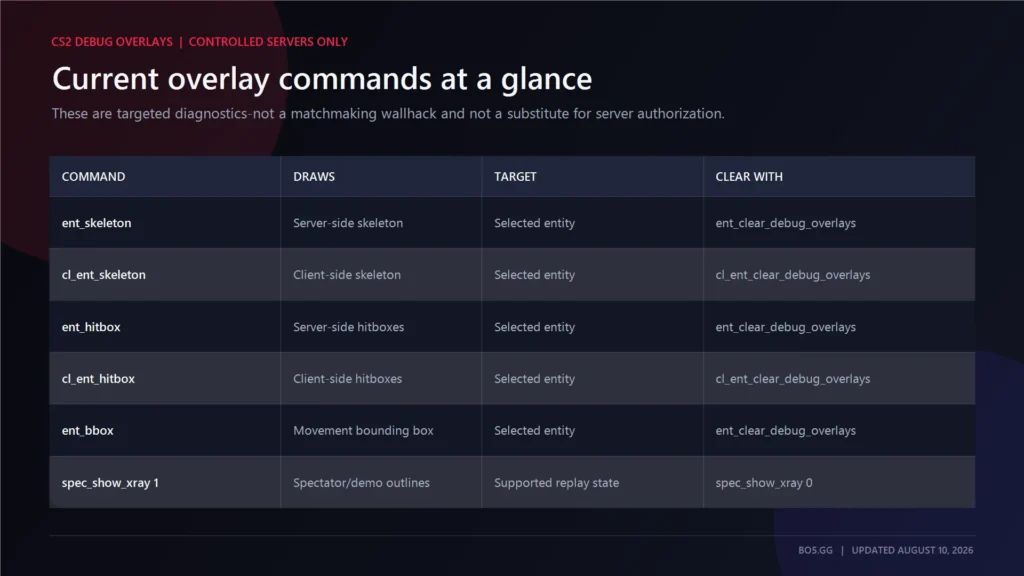
Most guides still tell you to use an old CS:GO command, but current CS2 no longer registers it. Source 2 now uses targeted entity-debug overlays rather than the old full-player wireframe effect.
Answer: On a local or privately controlled CS2 server, enable sv_cheats 1, select a player or bot, and use ent_skeleton or the related ent_hitbox and ent_bbox debug commands. These commands target a chosen entity; they are not a universal all-player wallhack. No one-line Source 2 replacement for CS:GO’s r_drawothermodels 2 is confirmed, and none of this works in official matchmaking.
Build reference: CS2 patch 1.41.7.4, Steam BuildID 24537688, August 3, 2026.
Build-sensitive note: The commands below are present in the referenced public command registry, but selector behavior and visual persistence can change between CS2 builds. Recheck them on a local server after major updates; this guide does not claim matchmaking access or a universal all-player selector.
Players often shorten wallhack to “WH,” while some call the effect “walls.” ESP is a broader term usually associated with third-party information overlays, which are outside the scope of this guide.
Key Takeaways
r_drawothermodels 2is an obsolete CS:GO command and is not registered in the current CS2 command list.- Current CS2 uses targeted skeleton, hitbox, and bounding-box debug overlays.
- The entity commands require
sv_cheats 1on a server you control. - A command with no selector targets the entity under your crosshair; it does not reveal every player.
- Demo and spectator x-ray use the separate
spec_show_xraysetting.
The CS2 Wallhack Commands That Work
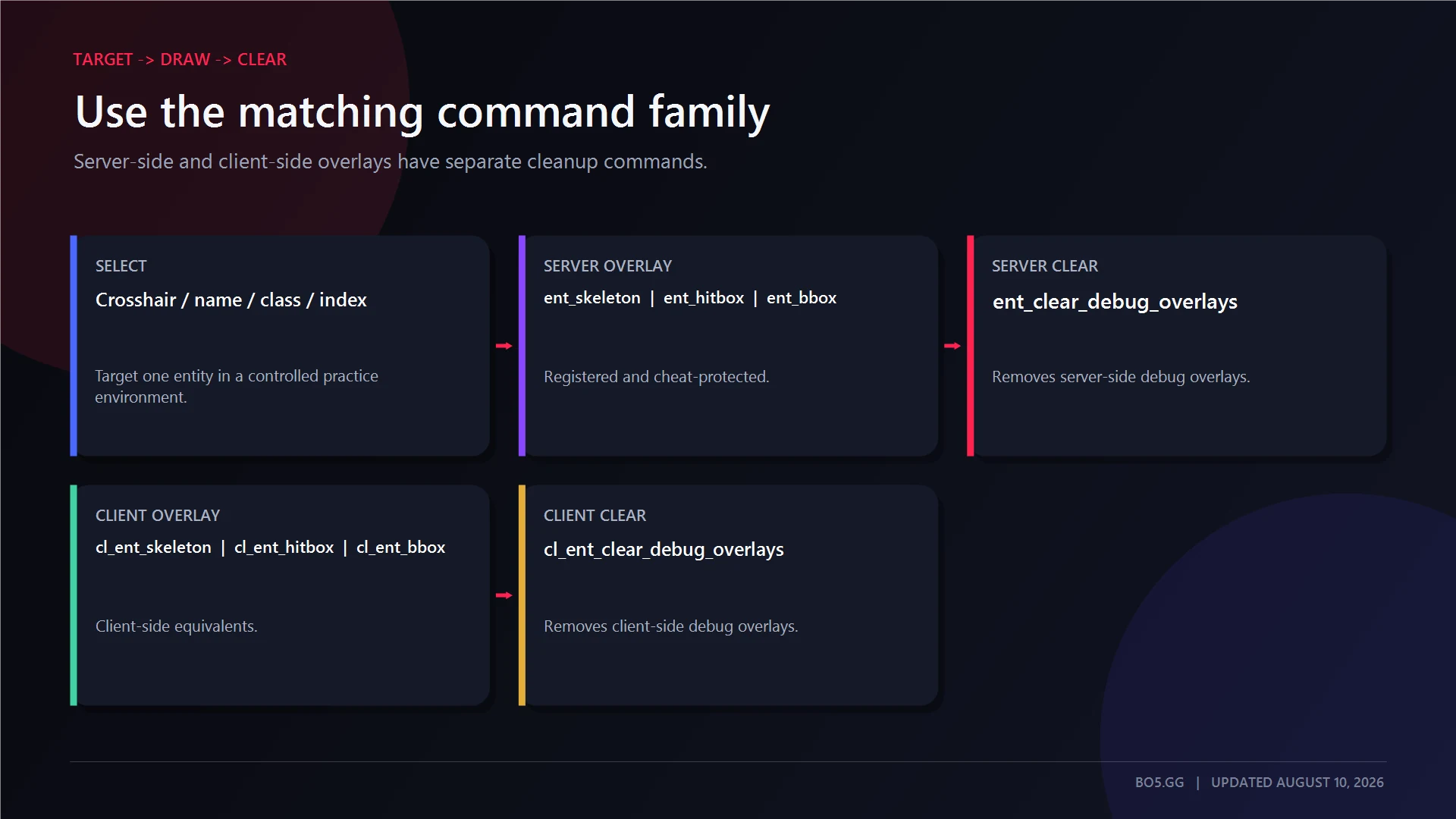
The current built-in method is an entity-debug overlay. It is not a traditional wallhack, and it does not display every player as a complete wireframe model.
To use one of these commands, you must choose a target. You can do that by looking directly at an entity or by supplying its name, class name, or numeric entity index.
No verified universal selector currently turns these commands into an all-player, one-line replacement for r_drawothermodels 2.
| Command | What it draws | Targeting method | How to clear it | Current status |
|---|---|---|---|---|
ent_skeleton |
Server-side skeleton for a selected entity | Crosshair target, entity name, class, or index | ent_clear_debug_overlays |
Registered and cheat-protected |
cl_ent_skeleton |
Client-side skeleton for a selected entity | Crosshair target, entity name, class, or index | cl_ent_clear_debug_overlays |
Registered and cheat-protected |
ent_hitbox |
Server-side hitboxes for a selected entity | Crosshair target, entity name, class, or index | ent_clear_debug_overlays |
Registered and cheat-protected |
cl_ent_hitbox |
Client-side hitboxes for a selected entity | Crosshair target, entity name, class, or index | cl_ent_clear_debug_overlays |
Registered and cheat-protected |
ent_bbox |
Server-side movement bounding box | Crosshair target, entity name, class, or index | ent_clear_debug_overlays |
Registered and cheat-protected |
cl_ent_bbox |
Client-side movement bounding box | Crosshair target, entity name, class, or index | cl_ent_clear_debug_overlays |
Registered and cheat-protected |
spec_show_xray |
Player outlines and name IDs in supported spectator modes | Takes 0 or 1 |
Set it to 0 |
Spectator and demo use only |
Draw a selected entity’s skeleton
First, aim at a visible player, bot, or another valid entity. You can then run the command without adding an argument.
For explicit targeting, replace the placeholder with the entity’s name, class name, or numeric index:
ent_skeleton <entity_name|class_name|entity_index>The server-side command reads entity information from the game DLL. Its client-side counterpart is:
cl_ent_skeleton <entity_name|class_name|entity_index>Do not type the angle brackets literally. They only show where the target value belongs.
Avoid copying undocumented selectors such as PLAYER, wildcards, or internal class strings from older community guides. No universal all-player selector is confirmed for the current public build.
Draw hitboxes instead of bones
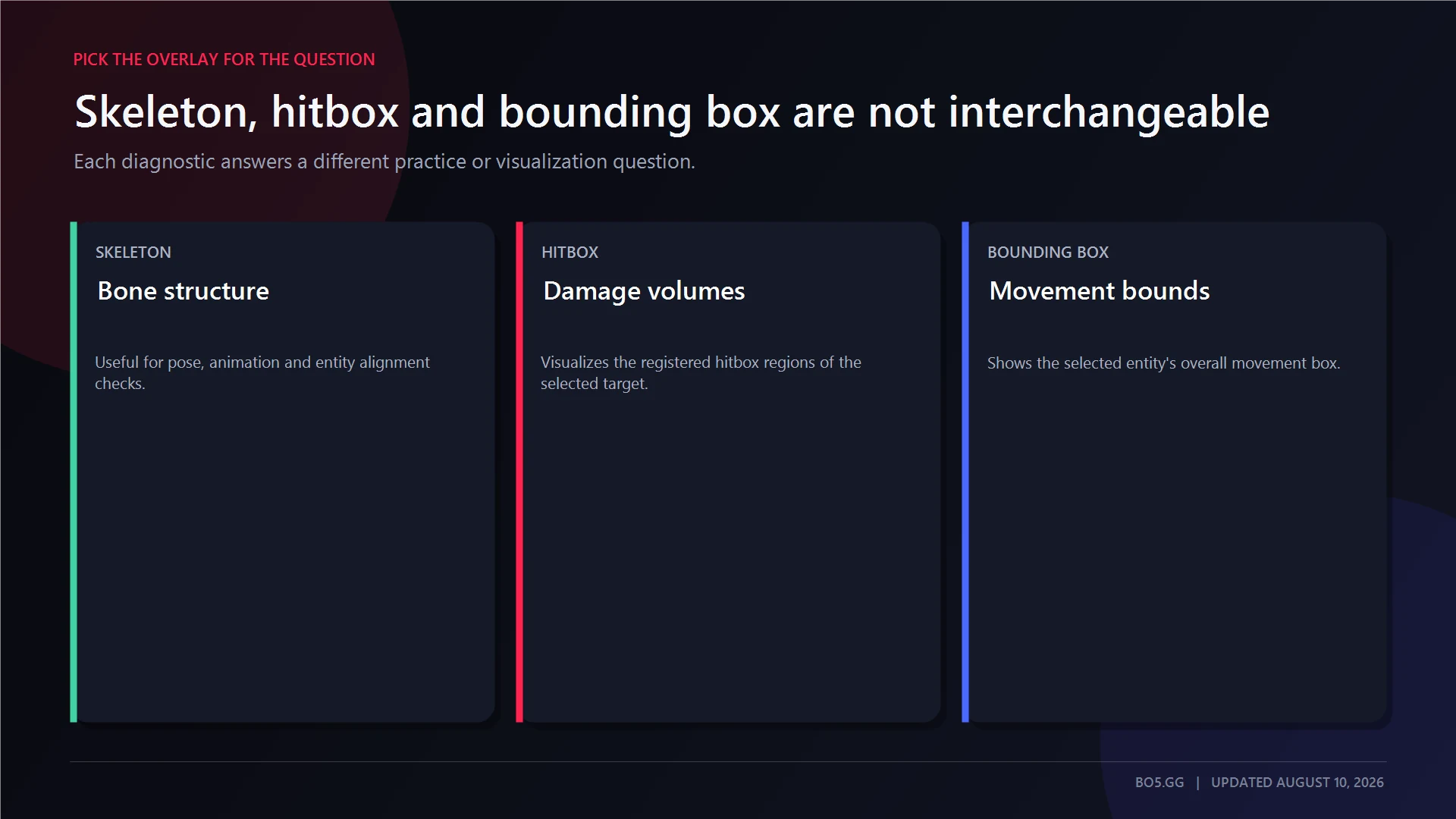
Hitbox commands display the selected entity’s hit regions rather than its bone structure:
ent_hitbox <entity_name|class_name|entity_index>
cl_ent_hitbox <entity_name|class_name|entity_index>
These commands are useful when you want to inspect model alignment or hit registration in a controlled practice setup.
Skeleton and hitbox overlays are different debug tools. Neither one is a complete player-model wallhack.
Draw a movement bounding box
Bounding-box commands display the selected entity’s movement box:
ent_bbox <entity_name|class_name|entity_index>
cl_ent_bbox <entity_name|class_name|entity_index>
The built-in command descriptions identify these as movement bounding-box overlays. They are useful for studying how entities move and where they are positioned, rather than checking precise bone or hit-region placement.
Clear the overlays safely
Before turning cheats off, clear both overlay domains:
ent_clear_debug_overlays
cl_ent_clear_debug_overlays
sv_cheats 0
Do not assume that running an entity command again will remove every active overlay. The dedicated clear commands provide the cleaner reset method.
You can also bind the clear commands to a key with BO5’s CS2 Binds Generator:
bind "f6" "ent_clear_debug_overlays; cl_ent_clear_debug_overlays"The bind removes the overlays. Disable sv_cheats separately when the practice session is finished.
Why r_drawothermodels 2 Does Not Work in CS2
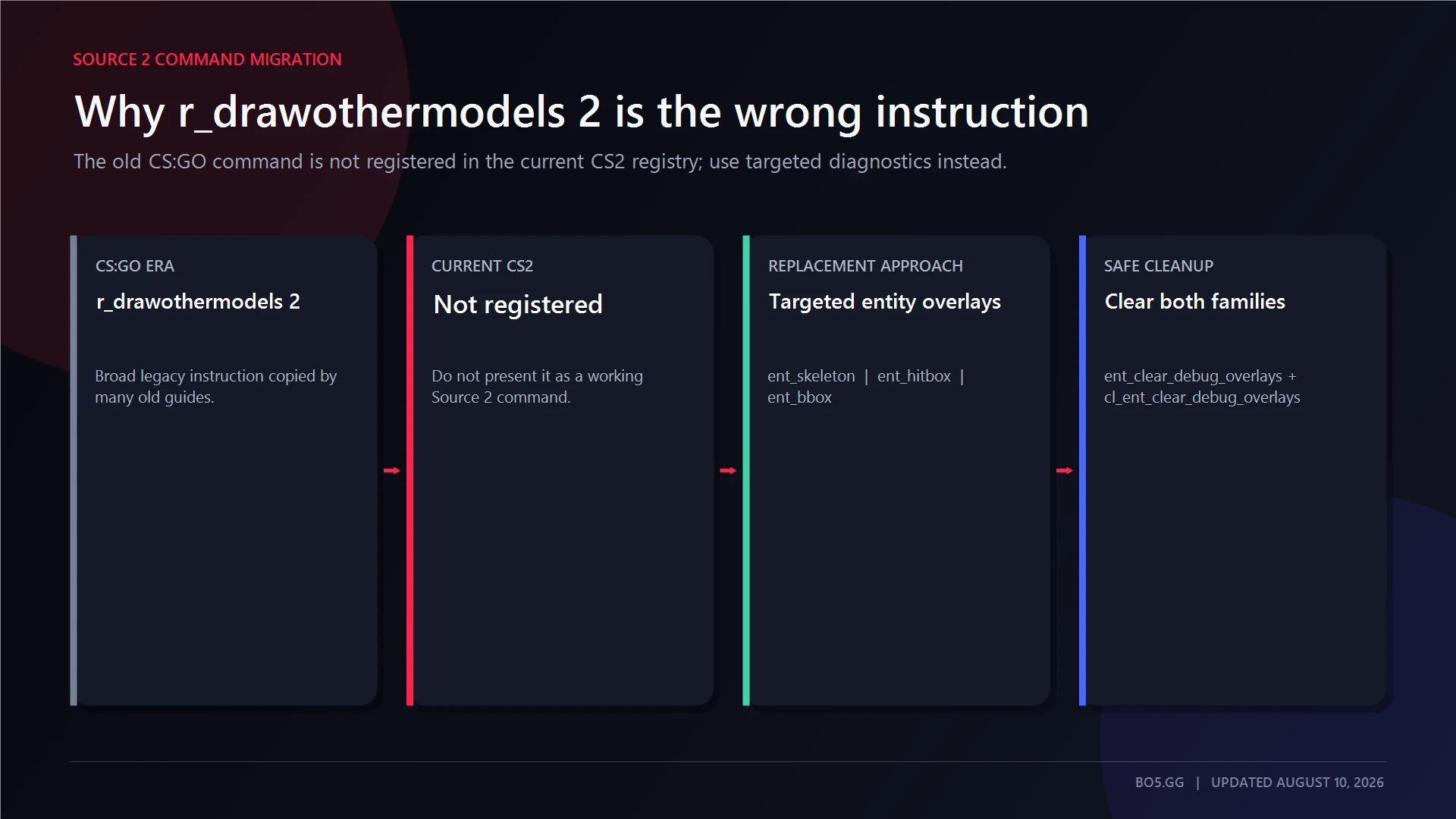
r_drawothermodels 2 is a CS:GO-era command and is not registered in the current CS2 command or ConVar list.
The old instruction was:
r_drawothermodels 2In CS:GO, value 2 drew other models in wireframe. CS2 moved to Source 2 and did not carry that command into the current retail command set.
Many guides still tell players to use the old method, but those instructions are out of date for CS2.
There is also no current registered command named enable_skeleton_draw. Guides that present it as the modern replacement should not be followed without direct, build-specific evidence.
mat_wireframe still exists as a broad renderer-debug setting, but it is not a confirmed player-only substitute for r_drawothermodels. Its retail-client behaviour is not reliable enough to include in the main instructions.
The same applies to r_aoproxy_show. The setting exists, but its current command listing does not document it as a player-visibility tool. It should not be presented as a verified wallhack command.
How to Enable sv_cheats 1 in CS2
Enable the developer console under Settings → Game → Enable Developer Console, then open it with the console key, usually ~.
This is a console setting, not a Steam startup flag. BO5’s CS2 launch options guide covers a different configuration system.
1. Start a controlled practice environment
Use one of the following:
- An offline practice match.
- A local game with bots.
- A Workshop map launched locally.
- A private listen server you host.
- A dedicated server you administer.
2. Enable cheat-protected commands
Enter:
sv_cheats 1sv_cheats is controlled by the server. Enabling it allows cheat-flagged commands in that server session.
3. Select an entity
First, look at a visible bot or player before using an entity command without an added selector.
For repeatable setups, use the entity’s name, class, or numeric index once it has been identified correctly.
4. Run the required overlay command
Choose the skeleton, hitbox, or bounding-box command that shows the information you need.
These commands do not automatically reveal every player. If you do not select a valid entity, the command may produce no useful overlay.
5. Clear the session
Use the cleanup sequence shown earlier, then leave the server or return to normal practice settings.
On a dedicated server, change sv_cheats through the server console, authenticated RCON, or another authorized administration method. A connected player cannot grant themselves server-level cheat privileges simply by typing commands into the client console.
Where These Commands Work — and Where They Do Not
Official matchmaking servers do not give ordinary players control over sv_cheats. These commands cannot be enabled there through the client console.
| Environment | Available? | Reason |
|---|---|---|
| Offline game with bots | Yes | You control the local server |
| Locally launched Workshop map | Yes | It runs in a controlled local environment |
| Private listen server you host | Yes | The host controls the server setting |
| Dedicated server you administer | Yes | The operator can enable cheats through server administration |
| Private lobby on infrastructure you do not control | No by default | A private lobby does not automatically grant server control |
| Community server owned by someone else | Only with permission | The server administrator controls the setting |
| Premier or official Competitive matchmaking | No | Players cannot change the server’s replicated cheat setting |
| FACEIT or ESEA competition | No | Competitive-platform rules prohibit unauthorized advantages |
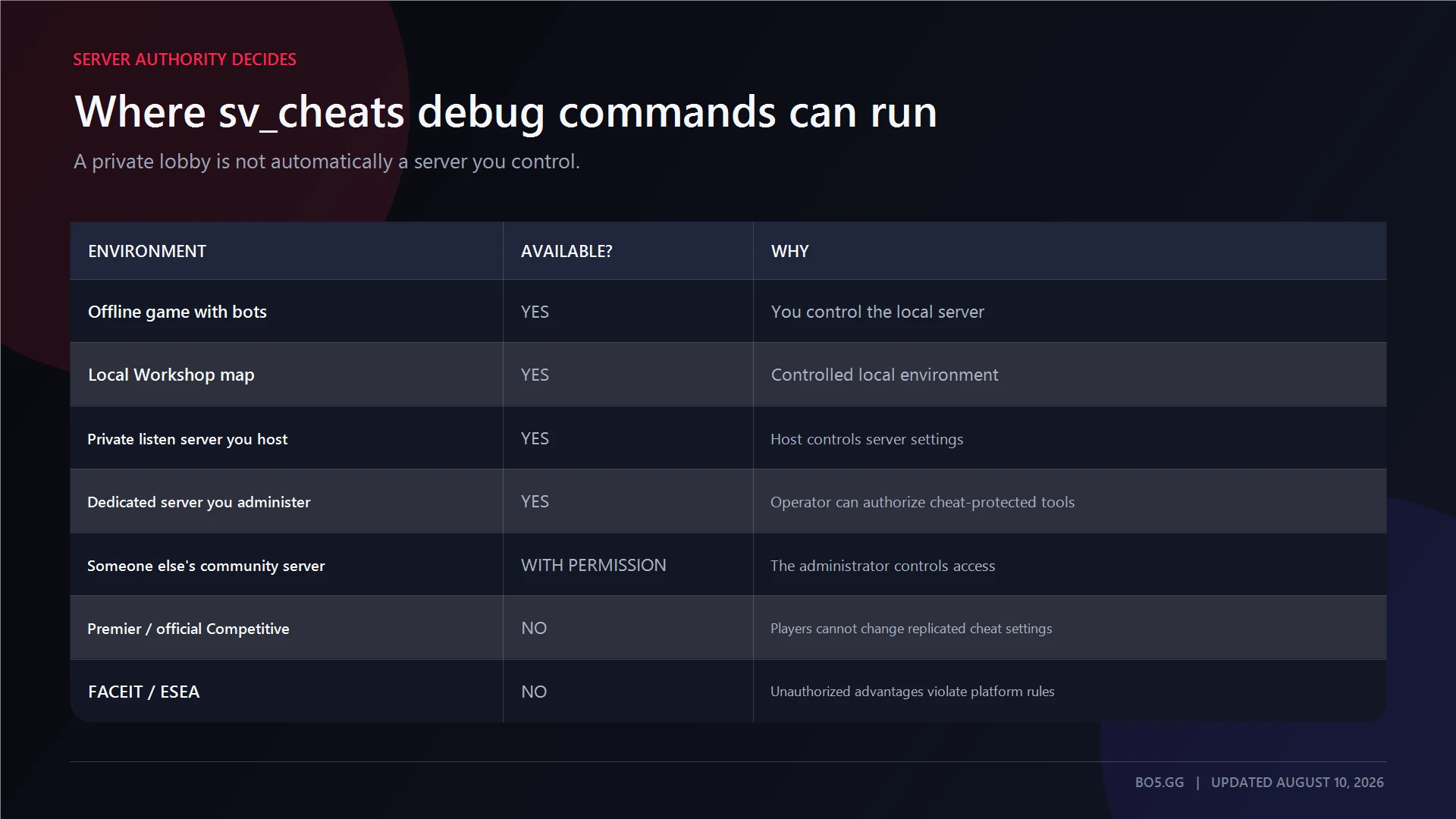
Just because a server is private does not mean you can use any command you choose. You must own it, administer it, or have clear permission from the person who does.
After learning an angle locally, move to normal play on BO5’s CS2 1v1 servers. Do not expect local debug commands to work on a public practice server.
Can You Get Banned for Using sv_cheats?
Using built-in debug commands on your own server, or on a private server where you have permission, is not the same as using third-party cheat software.
The commands only work when the server allows them. You cannot enable them on official matchmaking servers simply by entering them into the console.
That does not create a universal guarantee against penalties in every environment. Tournament organizers, server owners, leagues, and third-party platforms can set their own rules, so use these commands only where you have explicit permission.
Third-party wallhack and ESP software are different. Unauthorized cheat programs can lead to VAC or platform bans and may expose your system to malware.
This guide does not explain how to use third-party cheats, inject software, exploit matchmaking, evade VAC, or bypass any anti-cheat system.
Seeing Through Walls in a CS2 Demo
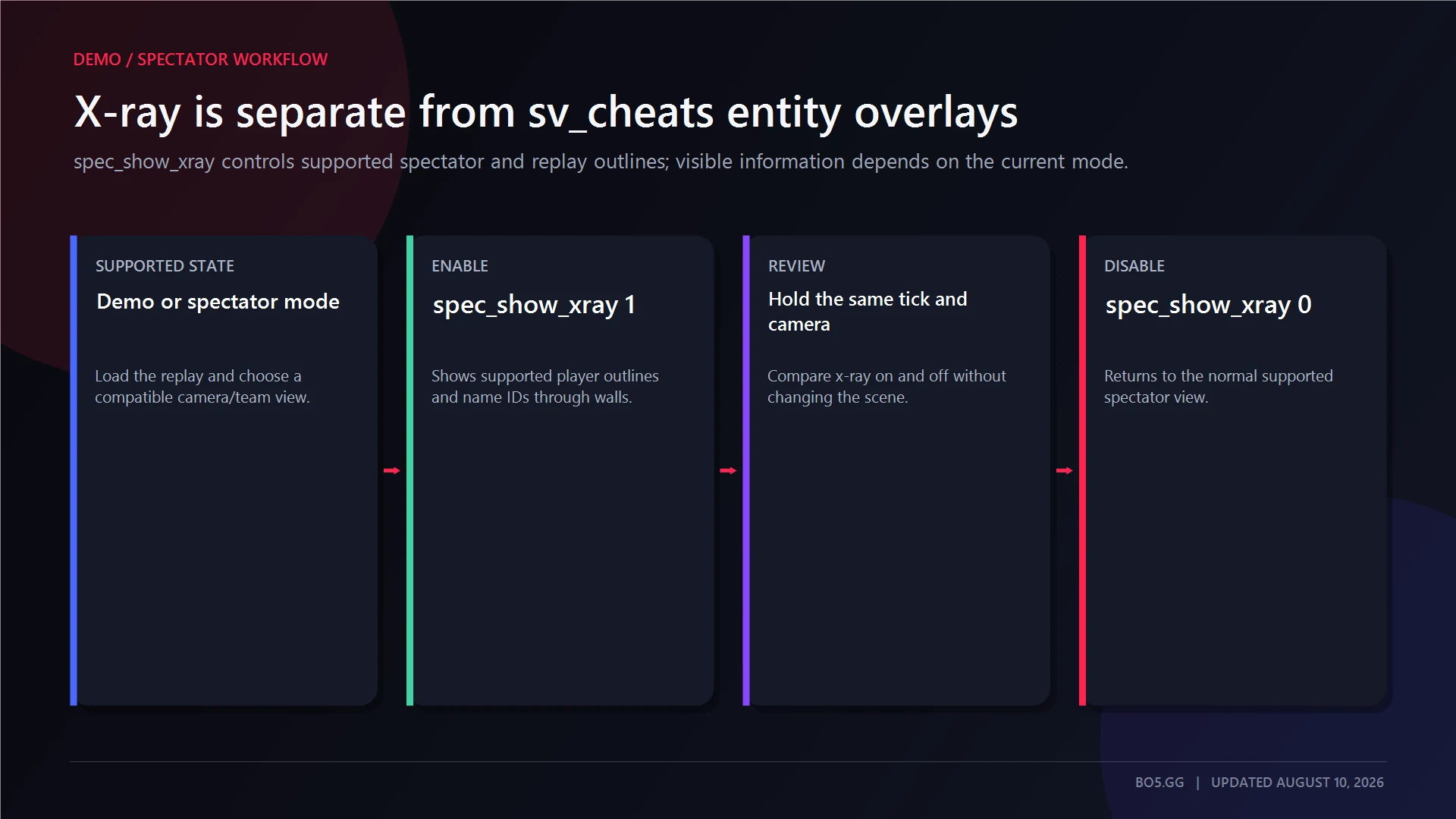
Demo and spectator x-ray work differently from cheat-protected entity overlays.
To use spectator x-ray, load a recorded demo, open the playback interface, and enable it:
playdemo <demo_name>
demoui
spec_show_xray 1
Turn it off when you are finished:
spec_show_xray 0spec_show_xray is intended for supported spectator and replay states. It controls player outlines and name IDs through walls, with the visible information depending on the current team and spectator mode.
Useful demo controls include:
demo_togglepause
demo_gototick <tick>
demo_timescale <value>
Do not use spec_show_xray as the active-player practice answer. It belongs to demos, GOTV, and supported spectator views.
Other sv_cheats Commands Worth Knowing for Practice
For movement training on a server you operate, continue with the BO5 CS2 bunny-hop command guide.
These commands can help you practise in a controlled map, bot, or shooting setup.
| Command | Purpose | Notes |
|---|---|---|
sv_showimpacts |
Displays bullet-impact information | Useful for comparing aim and registered impacts |
noclip |
Enables collision-free movement | Useful for exploring geometry and grenade positions |
bot_add |
Adds a bot | Creates a target for practice |
bot_place |
Places an existing bot at the aimed location | Requires a controlled server |
bot_stop |
Stops bot movement | Useful for repeatable screenshots and tests |
A compact practice setup is:
sv_showimpacts 1
noclip
bot_add
bot_stop 1
bot_place
noclip changes movement; it does not reveal players. sv_showimpacts visualizes bullet impacts rather than skeletons or hitboxes.
For movement-focused practice outside a local session, browse BO5’s CS2 bhop servers.
Practise the Same Angles Under Normal Conditions
Use entity overlays only to understand a specific position, model, or line of sight on a server you control.
Clear the overlays, disable cheats, and repeat the angle normally. Then test it against another player on CS2 1v1 servers.
For current matches, rankings, teams, and results, continue through the main BO5 CS2 hub.
FAQs
How do you clip through walls in CS2?
Clipping through geometry uses noclip, not a wallhack command. With sv_cheats 1 enabled on a controlled server, noclip removes normal collision and lets you fly through the map.
It is useful for learning a map’s layout, checking where grenades travel, and moving quickly between practice positions. It does not change which players or entities you can see.
How do you see bots through walls in CS2?
Bots are player entities, but the current debug commands still require a selected target. Start an offline game with bots, enable sv_cheats 1, aim at a visible bot, and use the relevant skeleton, hitbox, or bounding-box command.
Do not assume the command will automatically reveal every bot. No universal all-bot or all-player selector is confirmed for the current build.
After studying the position locally, practise it under normal conditions on CS2 1v1 servers.
Why is my wallhack command not working in CS2?
The most common cause is using the obsolete r_drawothermodels 2 instruction from CS:GO.
Other likely causes are that sv_cheats 1 has not been enabled by the server operator, the server is not under your control, or no valid entity was selected. A command without a selector only targets the entity under your crosshair.
Older selectors may also stop working when entity classes change between builds.
Do these commands work in CS2 matchmaking?
No. Ordinary players cannot enable the server-controlled sv_cheats setting in Premier or official Competitive matchmaking.
Do not attempt the same behaviour on FACEIT, ESEA, or any other competitive platform. Use these commands only in local practice or on a private server where the person in charge has explicitly allowed them.
How do you turn a CS2 wallhack command off?
Use the server-side and client-side overlay-clear commands, then set sv_cheats back to 0.
This removes the debug overlays more reliably than assuming every entity command behaves as a simple toggle. For faster cleanup, create a key bind with the BO5 CS2 Binds Generator.
Written by

Muhib Nadeem
11 published articles
CS2 writer and BO5 editor covering Counter-Strike guides, rankings, skins, and performance fixes.
Recommended posts
August 9, 2026
CS2 Bunny Hop Command: How to Enable Bhop
Enable auto-bhop on a CS2 server you control, adjust optional practice settings, use a matchmaking-safe wheel bind, and restore every value correctly.
August 9, 2026
Best CS2 Settings for FPS and Lower Input Lag
Choose CS2 settings for your hardware and display, separate lowest latency from tear-free VRR, preserve competitive visibility, and benchmark every change.
August 9, 2026
CS2 Viewmodel Settings: Every Command, FOV and Pro Config
Configure your CS2 viewmodel with current commands, defaults, practical presets and dated pro snapshots—without confusing weapon FOV with camera FOV or FPS.