
 Counter-Strike 2
 Valorant
 Dota 2
 League of Legends
Technical references and Valve's input policy checked on 30 August 2026.
The bind itself takes seconds. What matters is knowing which wheel direction you replaced, whether Space still works, and how to restore the old controls.
Wheel down:
bind "mwheeldown" "+jump". Wheel up:bind "mwheelup" "+jump". Both:bind "mwheelup" "+jump"; bind "mwheeldown" "+jump". Keep Space:bind "space" "+jump". These are separate keys, so one does not silently change the others. Any wheel direction assigned to Jump loses its conventional weapon-cycle action until restored.
Key Takeaways
- The least-disruptive starting setup is wheel down plus Space:
bind "mwheeldown" "+jump"; bind "space" "+jump". - Add wheel up only if you are comfortable giving up weapon cycling in both directions.
MWHEELUP,MWHEELDOWN, andSPACEare separate keys. Rebinding one does not silently alter the others.- Restore wheel up with
invprevand wheel down withinvnext;unbindleaves the selected direction empty. - Console binds normally persist. Use an autoexec only after confirming a real startup reset or overwrite.
The CS2 Scroll Wheel Jump Bind
bind "mwheeldown" "+jump"
bind "space" "+jump"
bind "mwheelup" "+jump"
bind "space" "+jump"
bind "mwheelup" "+jump"
bind "mwheeldown" "+jump"
bind "space" "+jump"
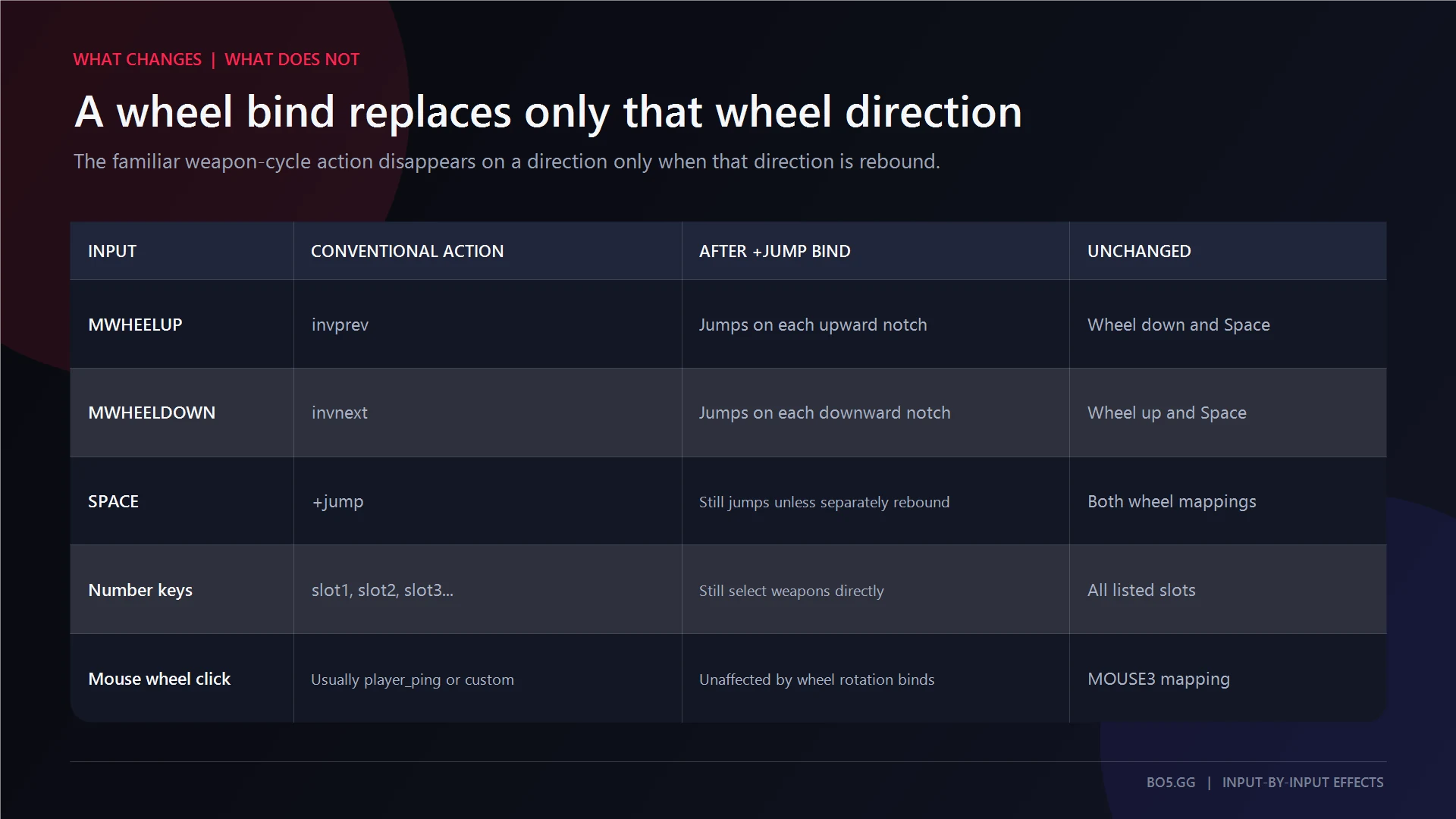
MWHEELUP, MWHEELDOWN, and SPACE are three separate keys. Binding wheel down does not remove wheel up or Space. It only replaces the action currently assigned to wheel down.
One wheel detent also does not magically send many jump inputs. One detent maps to one bound action. A fast wheel roll crosses several detents, so CS2 receives several separate jump requests in quick succession.
| Setup | Command | Effect | Conventional Restore |
|---|---|---|---|
| Wheel down | bind "mwheeldown" "+jump" |
Wheel down jumps and no longer runs invnext |
bind "mwheeldown" "invnext" |
| Wheel up | bind "mwheelup" "+jump" |
Wheel up jumps and no longer runs invprev |
bind "mwheelup" "invprev" |
| Both directions | bind "mwheelup" "+jump"; bind "mwheeldown" "+jump" |
Both directions jump; wheel weapon cycling is unavailable | bind "mwheelup" "invprev"; bind "mwheeldown" "invnext" |
| Space | bind "space" "+jump" |
Space jumps independently of the wheel | bind "space" "+jump" |
How to Keep Spacebar Jumping Too
Adding a scroll-wheel jump bind through the console does not silently remove Space. The inputs are independent. Several keys can point to the same +jump action.
Still, including this line is useful because it guarantees the final mapping:
bind "space" "+jump"
The Settings route is simpler when you only want one wheel direction:
- Open
Settings > Keyboard/Mouse > Movement Keys > Jump. - Select the current Jump assignment.
- Scroll up or down.
- Test the selected direction and Space afterward.
Use the console when you want wheel up, wheel down, and Space together. The menu is convenient for a simple replacement, but the console makes all three assignments explicit. After entering the three-line block, test wheel up, wheel down, and Space separately.
Scroll Up, Scroll Down, or Both?
Neither direction is objectively better. Choose the one that feels natural and consider leaving the other direction available for weapon cycling.
A practical starting point is:
bind "mwheeldown" "+jump"
bind "space" "+jump"
Binding both directions gives you more wheel detents to work with. It also removes both conventional wheel-cycle actions. It does not automate bunny hopping, improve air-strafing, or change movement physics.
| Your priority | Recommended mapping | What you retain |
|---|---|---|
| Lowest disruption | Wheel down + Space | Wheel-up weapon cycling |
| Maximum wheel availability | Wheel up + wheel down + Space | Space Jump, but no wheel weapon cycling |
| Restore the familiar layout | invprev up + invnext down + Space |
Both wheel-cycle directions |
For the movement mechanics and private-server commands, see BO5's guide to server-side CS2 bunny-hop commands. You can also use community bhop servers as a practice environment after confirming the bind works.
How to Get Weapon Switching Back
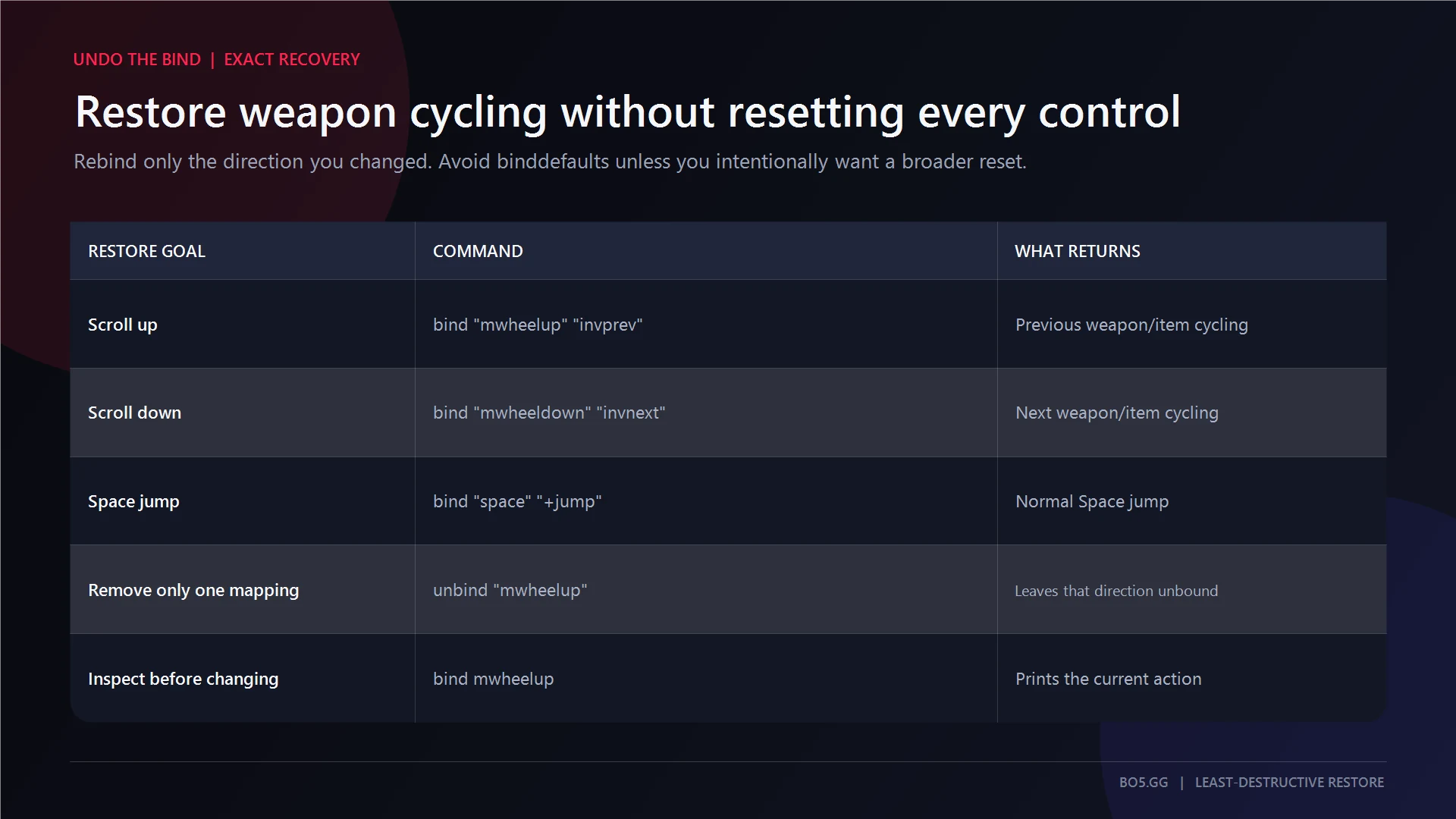
The conventional wheel mappings are:
bind "mwheelup" "invprev"
bind "mwheeldown" "invnext"
To restore the normal wheel layout and Space Jump together, use:
bind "mwheelup" "invprev"
bind "mwheeldown" "invnext"
bind "space" "+jump"
Restoring one direction changes only that key. You do not need to clear the entire control layout first.
To leave a direction completely unassigned, use the exact unbind syntax:
unbind "mwheelup"
unbind "mwheeldown"
Do not add the old action after the key. unbind "mwheelup" "+jump" is not the correct form. Also avoid unbindall as a normal reset. It removes every active keybind, not just the scroll-wheel change.
How to Check the Current Mapping
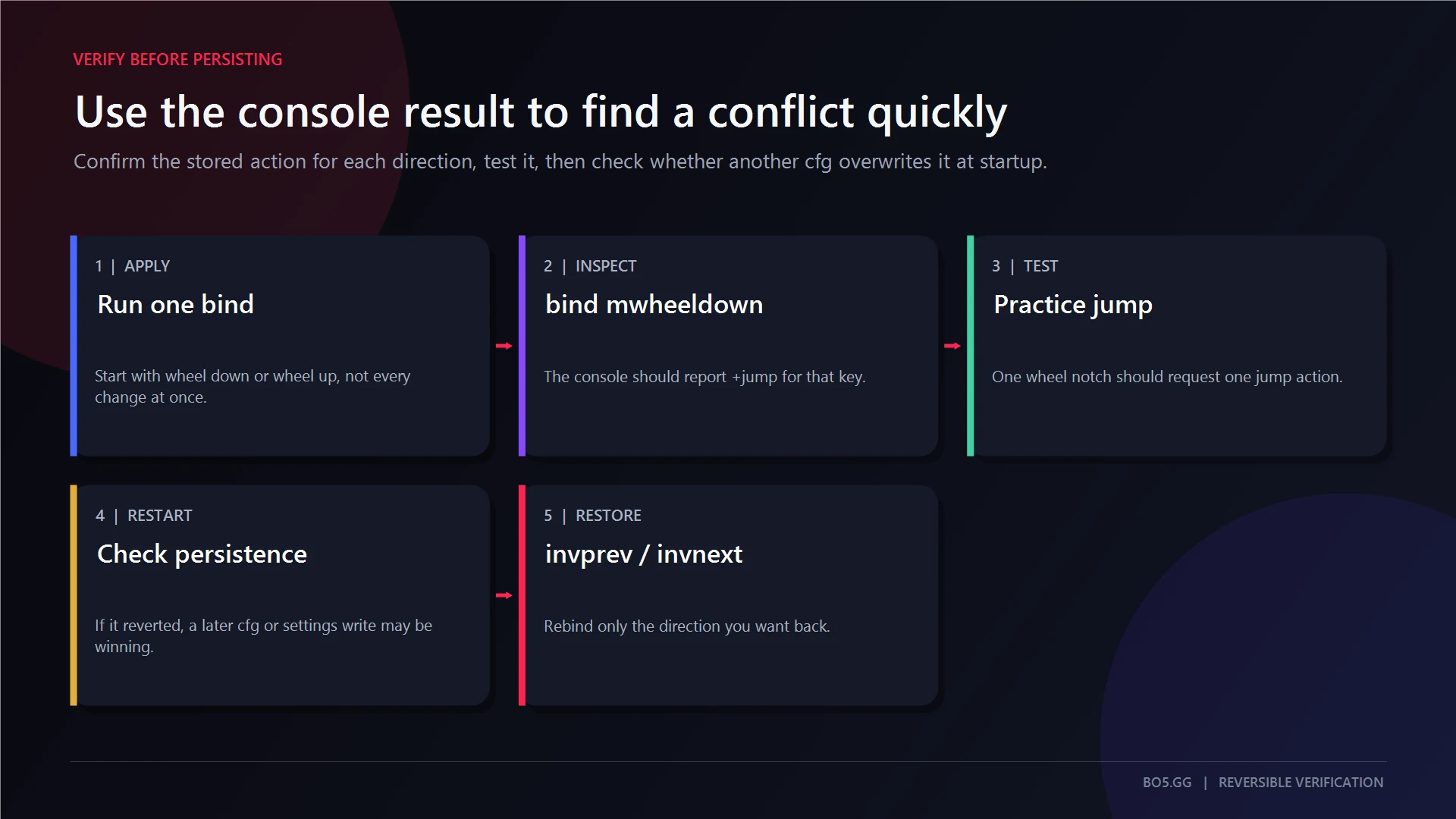
Before changing more settings, ask CS2 what each key currently does:
bind "mwheelup"
bind "mwheeldown"
bind "space"
To find every key mapped to Jump:
key_findbinding "+jump"
For a broader audit:
key_listboundkeys
A key has one current binding string. If the same key appears in several CFG files or is changed later through Settings, the last assignment executed wins.
A useful overwrite test is:
- Check the three mappings immediately after launching CS2.
- Run
exec autoexecif you use an autoexec. - Check the mappings again.
- Repeat the check after changing the Jump control in Settings.
If the mapping becomes correct only after exec autoexec, the file is not loading when expected or another startup source is replacing it. If Settings changes the result, the menu assignment is the later overwrite.
How to Keep the Bind After Restarting CS2
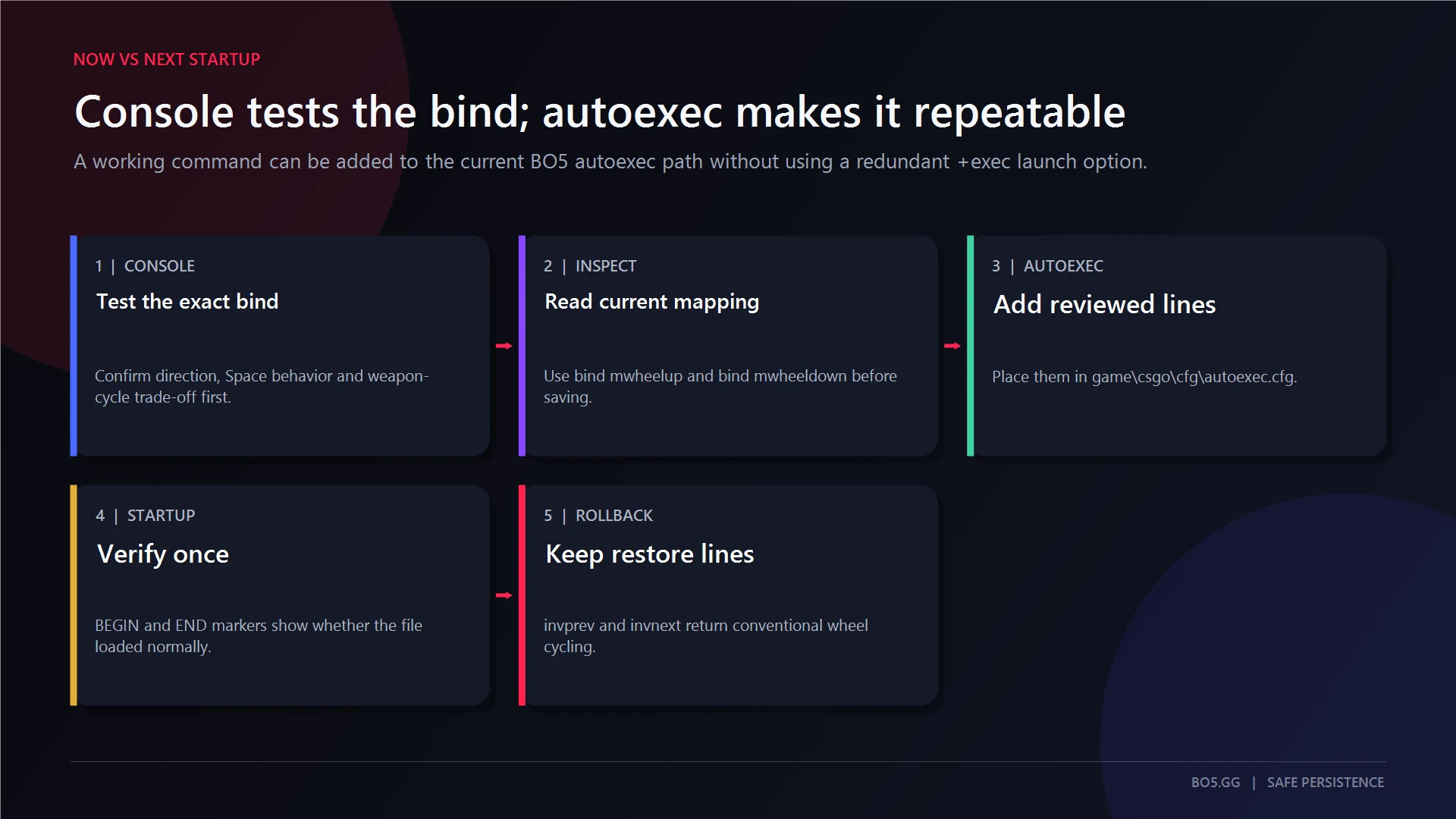
Ordinary console binds normally persist. Do not create a startup configuration before checking whether you actually have a persistence problem.
Apply the bind, restart CS2, and inspect it again:
bind "mwheeldown"
bind "space"
Use an autoexec only when the mapping genuinely resets or another startup source keeps replacing it. The current file location is:
<SteamLibrary>steamappscommonCounter-Strike Global Offensivegamecsgocfgautoexec.cfg
Put one command on each line, save the file with a real .cfg extension, and test it manually:
exec autoexec
BO5's CS2 autoexec guide covers the full setup. Do not add +exec autoexec.cfg as a routine launch option. First fix the path, extension, syntax, or duplicate assignment causing the reset.
Is a Scroll-Wheel Jump Bind Safe?
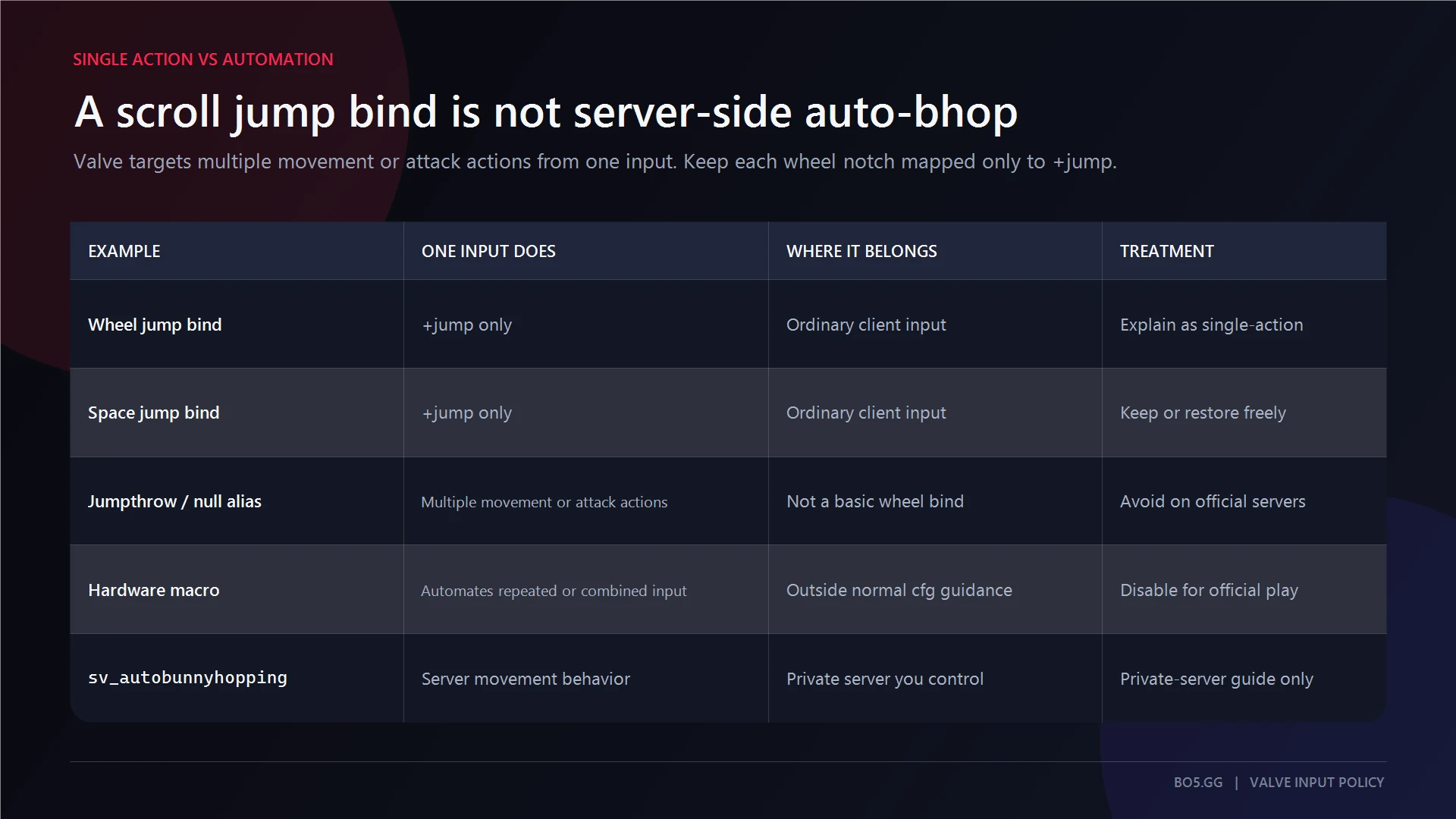
A normal scroll-jump bind maps one physical wheel detent to one +jump action. That is a single-action client bind.
These are different mechanisms:
- Server-side auto-bhop makes the server attempt repeated jumps while Jump is held.
- Jumpthrow or null aliases combine multiple protected movement or attack actions under one input.
- Hardware or software macros generate, repeat, time, or resolve inputs for the player.
Valve's published policy prohibits binds or automation that combine multiple movement or attack actions under one input. It does not identify an ordinary one-key-to-one-action +jump assignment as that behavior. This distinction is not a blanket anti-cheat guarantee for every third-party server, tournament, mouse utility, or future policy change. Keep the setup to native one-action binds and disable repeat, turbo, Snap Tap, SOCD, or similar automation features.
If the Bind Is Not Working
| Symptom | Likely Cause | Least-Risk Fix |
|---|---|---|
| Wheel does nothing | Typo, curly quotes, wrong direction, or mouse remapping | Retype the command with straight ASCII quotes, inspect both wheel keys, and disable test-only mouse remaps |
| Space stopped jumping | Settings or a CFG replaced its assignment | Run bind "space" "+jump" and inspect it again |
| Wheel jumps but no longer switches weapons | Expected replacement of invprev or invnext |
Restore that direction or keep only one wheel direction bound to Jump |
| Bind works until restart | A startup CFG or synced setting overwrites it | Inspect immediately after launch, then use one clean autoexec only if the reset is confirmed |
exec autoexec changes nothing |
Wrong folder, .cfg.txt extension, syntax error, or later overwrite |
Correct the file, run it manually, and query the same keys again |
| An old jumpthrow or movement alias is ignored | It combines protected actions | Remove the alias and use manual inputs rather than a bypass or macro |
FAQs
Does the Scroll Jump Bind Stay After Restarting CS2?
Normally, yes. CS2 usually retains ordinary keybinds between sessions. If yours resets, inspect the mapping immediately after launch. Look for another CFG, a Settings change, or synced configuration state. Use autoexec.cfg only after confirming that a later source is replacing the bind.
Can I Use Wheel Up, Wheel Down, and Space Together?
Yes. They are separate keys, so all three can map to +jump:
bind "mwheelup" "+jump"
bind "mwheeldown" "+jump"
bind "space" "+jump"
The cost is losing conventional weapon cycling on both wheel directions.
Why Did My Mouse Wheel Stop Switching Weapons?
Your new bind replaced the old action on that direction. Conventionally, wheel up uses invprev and wheel down uses invnext. Restore either one with its exact command, or keep one direction for Jump and the other for weapon cycling.
Is Scroll-Wheel Jump the Same as Auto-Bhop?
No. A scroll bind sends a Jump request for each physical wheel detent. Auto-bhop is controlled by the server and changes what happens when Jump is held. The bind does not automate landing timing, strafing, or speed retention.
Can I Bind Jumpthrow to the Scroll Wheel?
Jumpthrow is a separate multi-action topic. Old aliases commonly combined Jump with attack release under one input, which falls inside Valve's protected multi-action policy. Keep the scroll wheel mapped only to +jump and perform the grenade release manually.
Start With One Wheel Direction and Space
One wheel direction plus Space is the lowest-disruption starting point. It gives you scroll-based Jump input while keeping one direction for weapon cycling:
bind "mwheeldown" "+jump"
bind "space" "+jump"
Check the result, then add wheel up only if losing both weapon-cycle directions is worth it.
Sources and Verification
Commands, restoration behavior, inspection commands, and policy distinctions were checked against current references on 30 August 2026. No recorded hands-on current-build test is claimed.
Written by

Muhib Nadeem
21 published articles
CS2 writer and BO5 editor covering Counter-Strike guides, rankings, skins, and performance fixes.
Recommended posts
August 30, 2026
FACEIT Ranks and Elo Explained: Every Level in CS2
Current FACEIT CS2 Elo thresholds, every skill level, Season 9 soft-reset rules, Challenger status, party modifiers, leavers, and Premier limits.
August 30, 2026
How to Start Private Matchmaking in CS2
Choose the correct CS2 private-play route, start a ten-human Private Matchmaking pool, preserve teams, and diagnose lobby or server failures safely.
August 30, 2026
How to Unlock Premier in CS2
CS2 Premier requires Prime Status and Profile Level 10 on the same account. This guide separates access, rating calibration, XP planning, and safe lock troubleshooting.